Now you can listen to this article with the Online Text Reader


Welcome to ROM Cartridge.


Sections of this blog:


Have any text read aloud with human voices for free with this Online Text to Speech Reader


List of Online Text to Speech Readers in All Languages


Read classic books for free online in Oratlas Library:


Microsoft Introduces Surface Studio


Published: October 27, 2016

Yesterday Microsoft Corp. unveiled Surface Studio, a new device of the Surface family designed to put the user at the center of the creative process. The device is able to be transformed from a desktop PC into a digital canvas: an ultra High Definition touchscreen presented by Microsoft as the thinnest LCD monitor ever built. Designs in this canvas can be made with the Surface Pen, by touch, or with a new device known as the Surface Dial.

The transformation from Desktop mode into Studio mode is made by manipulating what Microsoft calls the Zero Gravity Hinge, a mechanism that allows users to effortlessly adjust the place and position of the screen. In the Studio Mode the screen sits at a 20-degree angle, the same as a standard drafting board. This way users can easily sketch, write, and design.

The new peripheral known as Surface Dial enables ways of manipulating programs that are exclusive to Surface Studio. When the Dial is placed over the monitor, the screen complements it with a set of digital tools specific to the app being used, allowing users to move through their workflow and make things such as changing the color or the size of their brush tip. All this can be done by users while they paint, without having to move the pen away from the screen.

The following two videos by Microsoft are a good way to meet the new product:


Share this article:


Why Are People Inviting You to Play Games on Facebook?


If you are getting too many game requests on Facebook and you want to know the reason why before you get rid of this problem, this article has the answer.
When people lose in a Facebook game, many of those games are designed to require players to invite all their friends in order to keep on playing. If they don't invite all their friends, they must wait minutes, hours, or even days in order to be able to keep on playing, or they can also pay some money instead.

As games can be very addictive and the proposal is made in a moment in which the player is very interested in keep on playing, the result is a lot of invitations being sent over and over again. As you may already have deduced, game producers use this tactic to promote their games and earn money, because the more players a game has, the more money their producers can earn by selling access to some of its parts or functions.

Finally, there may be people sending you an invitation because they are genuinely interested in sharing a game with you, just for the sake of it, but this is not the most frequent reason why people invite people to play.


Share this article:


Related articles:

How to Use Facebook >> Applications >> Why Are People Inviting You to Play Games on Facebook?


How to Use Facebook


How to Untag People in a Photo on Facebook


Want to untag people in a Facebook photo? This guide will show you how to do it.

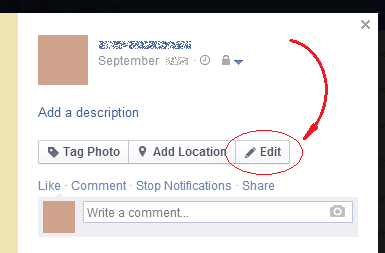
First go to the photo from which you want to remove the tags. You can only remove tags from a photo you uploaded.

Once there, at the right hand side of the photo, click on the Edit button.


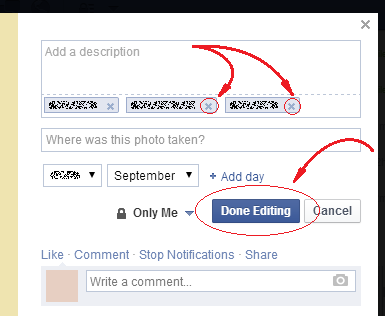
Then, in the appearing form, click on the x at the right hand side of the name of each person that you want to untag. Once you are done untagging people, click on the “Done Editing” button at the end of that small form.


This way the tags of the selected persons will be removed from that photo.


Share this article:


How to Use Facebook >> Photos and Videos >> How to Untag People in a Photo on Facebook


How to Change Your Birthday on Facebook


Want to change your birthday on Facebook? This guide will show you how to do it.

Once you have logged in to Facebook, on the top center of the page, click on your name or small profile picture.


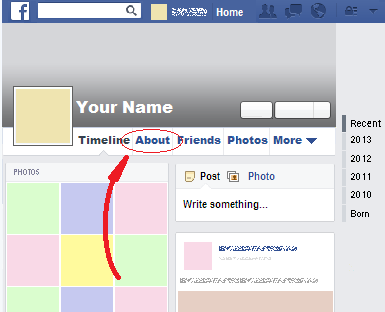
Once you have done that, click on the “About” option that is among the options right under your big cover picture:


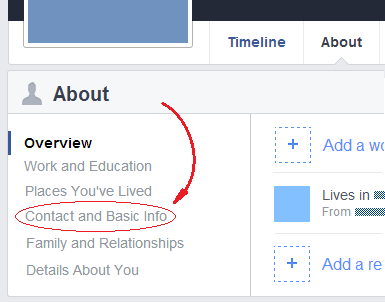
Once you have done that, in the left hand menu, select the “Contact and Basic Info” option.


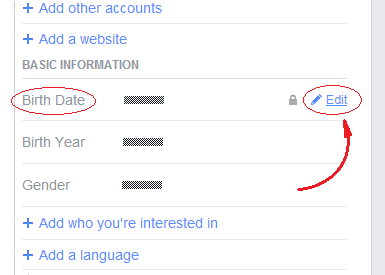
Then scroll down the page until you find the “Basic Information” section. There, hover your mouse over the “Birth Date” label and click on the appearing “Edit” option.


This will show you a form in which you will be able to choose the day, the month, and the year you were born.

Once you are done setting those values, click on the “Save Changes” button at the bottom of the form.

This way your birthday will be changed.


Share this article:


How to Use Facebook >> Facebook Account and Timeline >> How to Change Your Birthday on Facebook


How to Block Game Requests on Facebook


Want to stop receiving requests from a particular game on Facebook? This guide will show you how to do it.

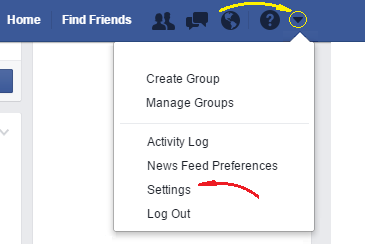
Once you have logged in to Facebook, click on the small triangle at the top right hand corner of the page and then select the option that says “Settings.”


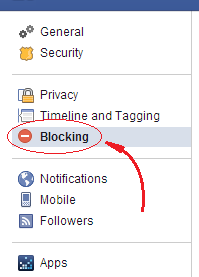
Once you have done that, in the left hand menu, click on the Blocking option, which is the one indicated in the next image:


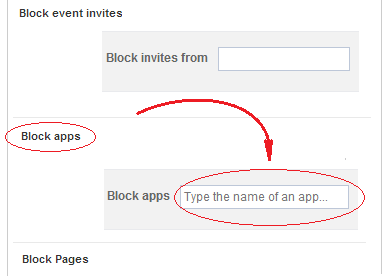
Then, in the appearing page, look for the section that says “Block apps” and type in its open text box the name of the game whose requests you want to block.


Once you have typed enough characters, you will see a drop down list appear with the name of the apps that start with that sequence of letters. That list can be navigated with the arrow keys of your keyboard and you can select an app in it by pressing Enter. Once you do that, the app will be immediately blocked.

As an example, if you want to block requests from the game called Candy Crush Saga, you just have to start typing its name and press Enter when you see it is the selected option in the appearing list.

This way you will no longer receive requests from the game in question.


Share this article:


Related articles:

How to Use Facebook >> Applications >> How to Block Game Requests on Facebook


Microsoft Creates a New Way to Type on Phones


Published: June 3, 2014

Windows Phone 8.1 comes with many new features. The most interesting among them is probably Shape Writing, a new way to type in the touchscreen of a smartphone.

Instead of pressing the buttons in the screen one by one, with Shape Writing users must slide one finger through the keyboard making small pauses in the letter they want to pick.

To prove that this way of typing is fast, Microsoft researchers and Windows Phone engineers challenged and broke the Guinness World Record for the fastest text message using a smartphone touchscreen.

Users of the new operating system will be able to write in this way since the beginning, without having to install any app or set their phones in any way.

Only time will tell if this new way of typing is to be preferred among smartphone users. If that happens, Microsoft's new operating system will have a remarkable advantage over the others.

Share this article:


How to See All the Friend Requests You Sent on Facebook


Want to see all the friend requests you made on Facebook? This guide will show you how to do it.

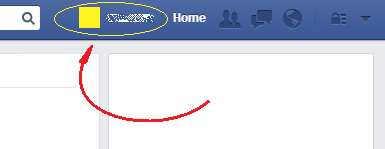
Once you have logged in to Facebook, on the top center of the page, click on your name or small profile picture.


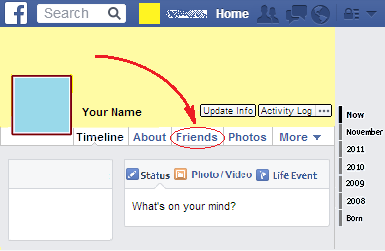
Then, click on the Friends option that is among the options that are right under your name and big cover picture.


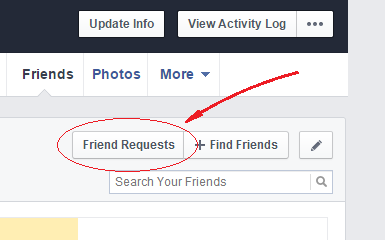
Once you have done that, click on the “Friend Requests” button, located close below the previous option.


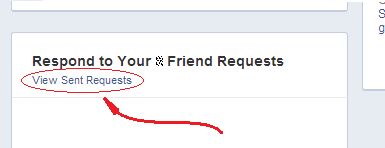
Finally, in the content of the new page, look for a link that says “View Sent Requests” and click on it.


This way you will see a list of all the friend requests you sent on Facebook.


Share this article:


How to Use Facebook >> Friends and Users >> How to See All the Friend Requests You Sent on Facebook


Twitter Celebrates Its Eighth Birthday with a Tool to See Anybody's First Tweet


Published: March 20, 2014

Tomorrow eight years will have passed since March 21 2006, the day in which Twitter co-founder Jack Dorsey sent the first tweet in history. The words chosen for that occasion, "just setting up my twttr."

As can be observed in that message, the original purpose of Twitter was to share with our acquaintances what we were doing. Lately users started publishing all kinds of texts, always inside the 140 characters restriction, and nowadays Twitter is Internet's standard for sending short messages and the favorite social network of celebrities all over the world.

To celebrate its eighth birthday, Twitter launched a site in which you can see anybody's first tweet as long as his or her account is not protected.

The site is first-tweets.com.


Share this article:


Robot Solves the Rubik's Cube in 3.25 Seconds


Published: March 17, 2014

Two days ago a robot called CubeStormer 3 solved the Rubik's cube in 3.253 seconds at the Big Bang Fair in Birmingham, UK, in this way breaking the Guinness World Record.


The previous record of 5.27 seconds had been set over two years ago by its predecessor CubeStormer II.

This new version of the robot employs an ARM-powered Samsung Galaxy S4 smartphone to analyze the cube and instruct four robotic hands to do the manipulations. ARM processors are also present in the eight Lego Mindstorms EV3 bricks that control the motors.

By ROM Cartridge. Image courtesy of Wikipedia.

Share this article:


Financed by Fans, 'Veronica Mars' Movie Hits Theaters


Published: March 16, 2014

After collecting almost $6 million dollars from more than 90 thousand people through its page on Kickstarter, the movie Veronica Mars was finally released last Friday.

The making of this movie will be remembered for being a successful case of crowdfunding, a new concept that consists in funding a project by raising small amounts of money from a large number of people wanting to cooperate, something that would be hard to do without the advantages of the Internet.

The website used to present the project and raise the money was Kickstarter, by now the most popular crowdfunding service. Among all the projects on Kickstarter, Veronica Mars broke many records: it was the fastest project in reaching $1 million and $2 million dollars; it is the project that has collected more funds in the film category, and the third among all categories. Besides, the project became the one in which more people put their money.

The original requirement to start the movie was a total sum of $2 million dollars, but this amount was highly surpassed by the final result. The eagerness with which people funded the project was in part due to the many rewards that were offered in exchange for the funds. These rewards went from a simple commitment to send production updates for the people who put $1, to a really short speaking role in the movie for the first backer to put $10,000.

Before this movie, Veronica Mars was known for being a TV series created by screenwriter Rob Thomas whose protagonist was portrayed by Kristen Bell. The series started on September 2004 and ended on May 2007.

It was Rob Thomas himself that presented the project on Kickstarter.

Trailer:


By ROM Cartridge. Image courtesy of Wikipedia.

Share this article:


An Incredible Interview with President Obama Appeared on the Web


Published: March 15, 2014

The next interview with President Obama appeared on the comedy website Funny or Die, most specifically in the show called Between Two Ferns hosted by Zach Galifianakis.


This video is also available here:

http://youtu.be/UnW3xkHxIEQ

And in the original page:

http://www.funnyordie.com/videos/18e820ec3f/between-two-ferns-with-zach-galifianakis-president-barack-obama

Share this article:


The World Wide Web Turns 25


Published: March 14, 2014

25 years have passed since March 12 1989, the day in which a British computer scientist called Tim Berners-Lee wrote a proposal concerning the management of information about experiments made at CERN, the European Organization for Nuclear Research. The main innovation in this proposal, that would become the World Wide Web, was the use of the hypertext, an already existing idea that consisted of a special kind of text that makes reference to another document, providing immediate access to it.

It was not until December 20 1990 that the first web page was ready to be accessed. The server that hosted that page was a NeXT computer, NeXT being the company created by Steve Jobs once he was fired from Apple during the 1980s.

On 1991, December 12, the first web server outside Europe started working, and on April 30 1993 CERN put the World Wide Web software in the public domain, releasing its source code.

Later, on October 1 1994, Tim Berners-Lee founded the World Wide Web Consortium (W3C), an international community to develop Web standards with the mission of leading the Web to its full potential.

Since that day the W3C remains the main standards organization for the World Wide Web.

By ROM Cartridge. Image courtesy of Wikimedia Commons.

Share this article:


These GIFs Give a 3D Sense Without 3D Glasses Needed


Published: March 11, 2014

Animated 3D Gifs are here, without need for 3D glasses. They are being shared in sites like Tumblr, Imgur, and Pinterest, and they give the sense of popping out the screen.

How is this made? The illusion is achieved by placing two vertical lines on the image, which gives the viewer the sensation of having the image behind those lines. Once some part of the images move hiding those lines, this give a trespassing sensation that creates a 3D sense in the viewer.

Here we have some examples:


Share this article:


JavaScript setUTCFullYear Method


The setUTCFullYear method sets the year value of the point in time stored in a Date object according to Coordinated Universal Time.

Besides, it can also be used to change its month, its day of the month, or to modify the date by increasing or decreasing it in a provided quantity of months or days.

The value returned by this method is the quantity of milliseconds passed since January 1st 1970 until the point in time stored in the Date object once it has been modified.


Syntax

The setUTCFullYear method has three overloads:

myDate.setFullYear( year )

myDate.setFullYear( year, months )

myDate.setFullYear( year, months, days )

With:
  • year being a required parameter that sets the year of the point in time stored in a Date object according to Coordinated Universal Time.
  • months being being an optional parameter that consists of an integer number that, when it is between 0 and 11, changes only the month value of the point in time stored in a Date object according to Coordinated Universal Time. Any month value outside that range increases or decreases the point in time of a Date object in a quantity equal to the range's limit being exceeded plus the remaining months. If the parameter is an integer between 0 and 11 but the day of the month in the Date object does not exist for the month being indicated by the parameter, once the new month is assigned the point in time will be increased in a quantity equal to the days remaining in the parameter.
  • days being an optional parameter that consists of an integer number that, when it is between 1 and the last day of the month, changes only the day of the month of the point in time stored in a Date object according to Coordinated Universal Time. Any value outside that range increases or decreases the point in time of a Date object in a quantity equal to the range's limit being exceeded plus the remaining days.
  • myDate being an object based on the Date object.


Example

The following code uses the setUTCFullYear method to change the year value of the point in time stored in Date object according to Coordinated Universal Time:

<script type="text/javascript">

var currentDate = new Date();

var outcome = "Current date, according to Coordinated Universal Time, is: <br /><br />";
outcome += currentDate.toUTCString() + "<br /><br />";

currentDate.setUTCFullYear(1776);

outcome += "After changing its year value to 1776 according to Coordinated Universal Time, the resulting date is:<br/><br/>";

outcome += currentDate.toUTCString();

document.write(outcome);

</script>


Technical Details

The setUTCFullYear method belongs to the Date object, it is available since the version 1.3 of JavaScript, and it is supported in all major browsers.


JavaScript Manual >> Date Object >> setUTCFullYear Method


JavaScript setUTCDate Method


The setUTCDate method sets the day of the month of the point in time stored in a Date object according to Coordinated Universal Time.

Besides, it can also be used to increase or decrease the point in time of that object in a given quantity of days.

The value returned by this method is the quantity of milliseconds passed since January 1st 1970 until the point in time stored in the Date object once it has been modified.


Syntax

myDate.setUTCDate( days )

With:
  • days being an integer number that, when it is between 1 and the last day of the month in question (which can be 28, 29, 30, or 31), changes only the day of the month of the point in time stored in a Date object according to Coordinated Universal Time. Any value outside that range increases or decreases the point in time of a Date object in a quantity equal to the range's limit being exceeded plus the remaining days.
  • myDate being an object based on the Date object.


Example

The following code uses the setUTCDate method to change the day of the month value of a Date Object to 15 according to Coordinated Universal Time:

<script type="text/javascript">

var myDate = new Date();

var outcome = "According to Coordinated Universal Time, current date is: <br/><br/>";
outcome += myDate.toUTCString() + "<br/><br/>";

myDate.setUTCDate(15);
outcome += "After changing its day of the month to 15 according to UTC, the resulting date is: <br/><br/>";
outcome += myDate.toUTCString();

document.write(outcome);

</script>


Technical Details

The setUTCDate method belongs to the Date object, it is available since the version 1.3 of JavaScript, and it is supported in all major browsers.


JavaScript Manual >> Date Object >> setUTCDate Method


JavaScript setTime Method


The setTime method sets the point in time of a Date object by adding or subtracting a quantity of milliseconds to the beginning of January 1st 1970 of the Coordinated Universal Time.


Syntax

myDate.setTime( milliseconds )

With:
  • milliseconds being an integer number either positive or negative equal to the difference in milliseconds since the point in time that is being assigned to the Date object and January 1st 1970 of the Coordinated Universal Time.
  • myDate being an object based on the Date object.


Example

The following code uses the setTime method to add 1000 milliseconds to January 1st 1970 of the Coordinated Universal Time.

<script type="text/javascript">

var myDate = new Date();

myDate.setTime(0);

var outcome = "After adding 1000 milliseconds to the following point in time:<br /><br/>";
outcome += myDate.toUTCString() + ",<br /><br />";

myDate.setTime(1000);

outcome += "the resulting point in time is:<br /><br/> ";
outcome += myDate.toUTCString() + ".<br /><br />";

document.write(outcome);

</script>


Technical Details

The setTime method belongs to the Date object, it is available since the version 1.0 of JavaScript, and it is supported in all major browsers.


JavaScript Manual >> Date Object >> setTime Method


JavaScript setSeconds Method


The setSeconds method sets the seconds value of the point in time stored in a Date object.


Syntax

The setSeconds method has two overloads:

myDate.setSeconds( seconds )

myDate.setSeconds( seconds, milliseconds )

With:
  • seconds being a required parameter that consists of an integer number that, when it is between 0 and 59, changes only the seconds value of the point in time stored in a Date object. Any value outside that range increases or decreases the point in time of a Date object in a quantity equal to the range's limit being exceeded plus the remaining seconds.
  • milliseconds being an optional parameter that consists of an integer number that, when it is between 0 and 999, changes only the milliseconds value of the point in time stored in a Date object. Any value outside that range increases or decreases the point in time of a Date object in a quantity equal to the range's limit being exceeded plus the remaining milliseconds.
  • myDate being an object based on the Date object.


Example

The following code uses the setSeconds method to set the seconds value of the current time to 30:

<script type="text/javascript">

var currentDate = new Date();

var outcome = "Current time is: <br /><br/>" + currentDate.toTimeString();
outcome += "<br/><br/>";

currentDate.setSeconds(30);

outcome += "After changing its seconds value to 30, the time is: <br /><br />";
outcome += currentDate.toTimeString();

document.write(outcome);

</script>


Technical Details

The setSeconds method belongs to the Date object, it is available since the version 1.0 of JavaScript, and it is supported in all major browsers.


JavaScript Manual >> Date Object >> setSeconds Method


JavaScript setMonth Method


The setMonth method sets the month value of the point in time stored in a Date object. If the already stored day of the month does not exist in the month that you are trying to assign, the remaining days will increase the point in time after the new month is assigned.

Besides, this method can also be used to set the day of the month value, and to increase or decrease the point in time.

The value returned by this method is the quantity of milliseconds passed since January 1st 1970 until the point in time stored in the Date object once it has been modified.


Syntax

The setMonth method has two overloads:

myDate.setMonth( months )

myDate.setMonth( months, days )

With:
  • months being being a required parameter that consists of an integer number that, when it is between 0 and 11, changes only the month value of the point in time stored in a Date object. Any month value outside that range increases or decreases the point in time of a Date object in a quantity equal to the range's limit being exceeded plus the remaining months. If the parameter is an integer between 0 and 11 but the day of the month in the Date object does not exist for the month being indicated by the parameter, once the new month is assigned the point in time will be increased in a quantity equal to the days remaining in the parameter.
  • days being an optional parameter that consists of an integer number that, when it is between 1 and the last day of the month, changes only the day of the month of the point in time stored in a Date object. Any value outside that range increases or decreases the point in time of a Date object in a quantity equal to the range's limit being exceeded plus the remaining days.
  • myDate being an object based on the Date object.


Example

The following code uses the setMonth method to set the month of the current date to January:

<script type="text/javascript">

var currentDate = new Date();

var outcome = "The current date is:<br /><br />";
outcome += currentDate;
outcome += "<br /><br />";

currentDate.setMonth(0);

outcome += "After changing the month to January, the resulting date is:";
outcome += "<br /><br />";
outcome += currentDate;

document.write(outcome);

</script>


Technical Details

The setMonth method belongs to the Date object, it is available since the version 1.0 of JavaScript, and it is supported in all major browsers.


JavaScript Manual >> Date Object >> setMonth Method


© Copyright 2010-2018 ROM Cartridge


Books to Read and Listen to Online